
The official ROB RUN friend-server instructions provide a specific path. This guide follows that path and separates the party invitation from the server choice so you can tell which part has actually completed. It does not invent a main-menu server browser or promise that your existing base moves with you.
Before acting, confirm that the problem really is different servers. If you instead have an error code or a stalled status screen, use the relevant diagnostic guide first.
Confirm the destination before ending the current run
Ask your friend which server they are actually using and compare it with your current situation. A party invitation and a shared server are related requirements, not two names for the same thing. Repeating invitations without resolving the mismatch may not change the underlying situation.
Agree who will move before starting the process. This is a useful coordination step: it avoids both players simultaneously leaving for a different destination. Record the intended server identity clearly enough to recognize it when the selection becomes available.
- Compare the server information with your friend.
- Agree which player will move and which destination they will select.
- Review the effect on the current run before choosing surrender.
Understand what Surrender to Feds is not
The phrase is different from ordinary surrender to a cop. Ordinary police surrender concerns the bag and equipped gear outcome in an encounter. The documented server-transfer route goes through Prison and should not be treated as a way to preserve an entire active base or inventory on another server.
Review the reset and run-ending context and decide whether you are ready to leave the present situation. The official friend-transfer article explains the route but does not provide an item-by-item migration guarantee. Do not fill that gap with a claim that all assets follow the invitation.
| Action | What to distinguish |
|---|---|
| Party invite | A request to group; not proof of a server transfer. |
| Ordinary surrender to police | An encounter outcome with specific bag and gear rules. |
| Surrender to Feds | The Prison route used by the official friend-server instructions. |
| Changing server | Selecting the intended destination once in prison. |
| Fresh invitation | The grouping step after server alignment. |
Use the global map and Prison route
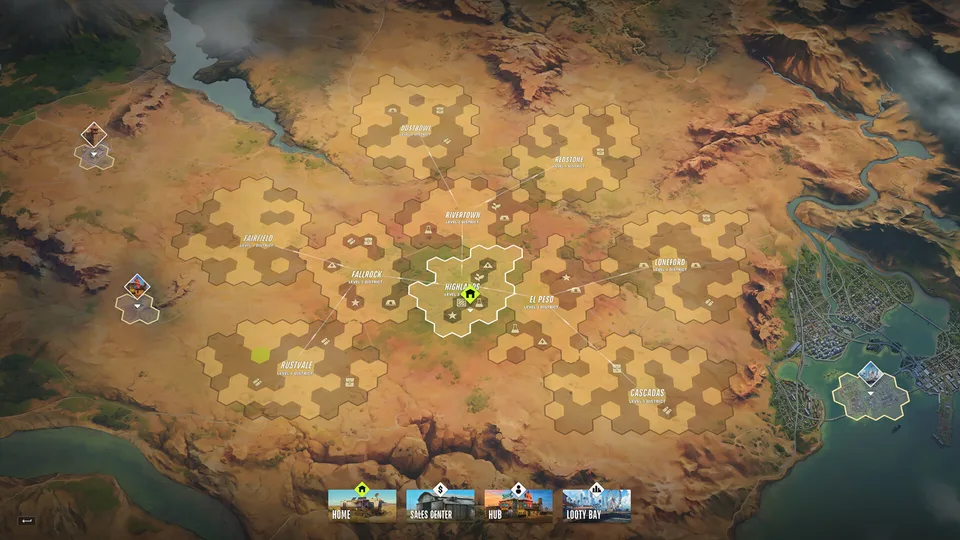
Open the global map, select the Prison location and choose Surrender to Feds. Those are the named steps in Kefir’s instructions. Read the confirmation and any current in-game explanation before committing, especially if you still have an unfinished goal on the present server.
This guide intentionally does not name an unverified keyboard shortcut for the global map or assume an exact layout for every menu. Follow the location and action labels, and stop to read if the current interface presents a consequence you have not considered.
- Open the global map.
- Select the Prison location.
- Choose Surrender to Feds after reviewing the effect on your run.
- Once in prison, proceed to the available server choice.
Select the intended server from prison
Once inside prison, switch to the friend’s server through the choice available there. Confirm the destination rather than picking a server merely because its name looks similar. If regions or server options differ from a guide screenshot, use the current game information.
Do not assume a destination is available just because it appeared in an older list. The official method establishes where the switch occurs, not a permanent public roster. If the intended option is unavailable, capture the actual message and compare it with official announcements before repeatedly starting over.
Resend the invitation after alignment
Kefir specifically includes sending the party invitation again after switching. Treat that as its own step. Confirm both players are now using the intended destination and then create the fresh invitation, rather than assuming an old request remains sufficient.
If the error still says the other player is elsewhere, compare the actual server information again. If a different error appears, record it as new evidence instead of assuming the original mismatch must still be the cause. That keeps a grouping problem separate from a connection or account failure.
If the official sequence does not work
Write down which part failed: map access, the surrender interaction, the server choice or the new party invitation. A report tied to one step can be investigated more easily than a general statement that you cannot join a friend. Include the exact message and a screenshot where appropriate.
Use Kefir’s official support route and the UID if requested. This independent guide cannot alter a party, restore a previous server’s assets or bypass an unavailable selection. Keep irreversible game decisions separate from routine troubleshooting retries.
- Check the actual destination before starting the process.
- Read the run-ending consequences, not just the action label.
- Use the Prison selection described by the developer.
- Create a fresh party invitation afterward.
- Report the specific failed step rather than repeating the whole sequence blindly.
Change Server & Join Friends FAQ
01Can I switch just by accepting a party invitation?
The official article describes a separate Prison and server-selection route. An invitation alone does not establish that the servers have been aligned.
02Is Surrender to Feds the same as surrendering to a cop?
No. The names refer to different contexts and consequences. Ordinary police surrender has a specific bag and gear rule; the friend-server method uses Prison.
03Will my whole base transfer with me?
No complete asset-migration guarantee is established by the referenced friend-transfer instructions. Review run-ending and reset consequences before acting.
04Why should I send the invitation again?
It is part of Kefir’s documented sequence after switching to the friend’s server. Confirm the destination first, then create the fresh invitation.
Sources & useful references
Game rules below are linked to their official references. Tactical suggestions in this guide are practical advice, and do not promise a particular payout or outcome.