This ROB RUN map guide connects the official overview screenshot with the services described in Kefir’s help. It is a practical location reference rather than an interactive database of unverified pins. The useful question is often what a place does and what condition applies when you reach it.
The screenshot is a broad orientation aid. Use your current in-game map for exact positions and available interactions; the guide does not invent coordinates, spawn timers or guaranteed loot at a marker.
Read Looty Bay and the desert as different contexts
Looty Bay supports city services and robberies, while the wider desert connects settlements, bases and territory activity. The distinction is mechanical as well as geographic: the official loss rules treat city roles and desert deaths differently. Do not plan a trip using only the distance to a destination.
Before leaving, identify whether your next action is a service errand, a robbery or a visit to a base. That determines which prerequisites and risks you need to check. The loss matrix is a useful companion to the map when you carry valuable equipment.
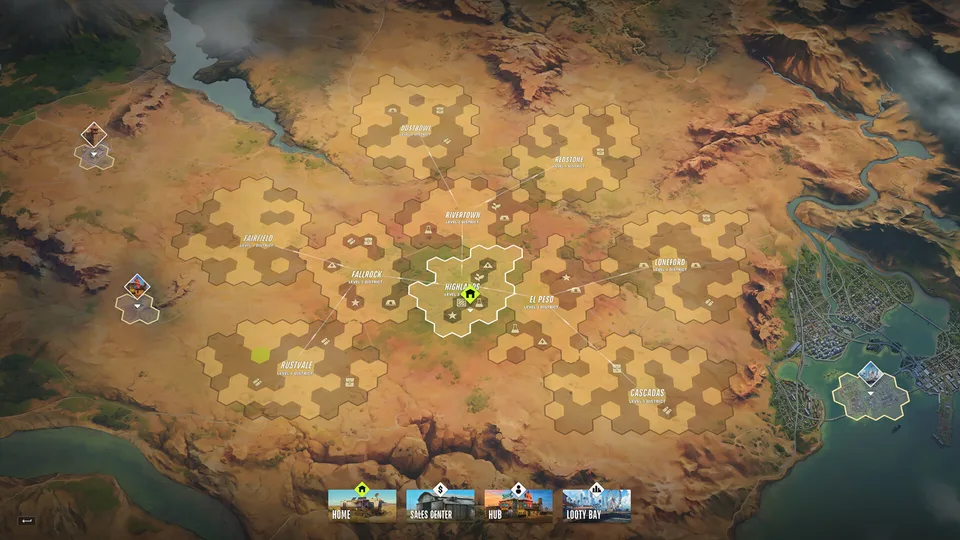
A service-first location reference
Use the location for the action it actually supports. A bank account, a loot sale and a laundering process happen through different parts of the game. Visiting one does not automatically complete the others.
| Place or marker | Purpose | Condition to remember |
|---|---|---|
| Lenny’s Motel | Early guidance and a Black Market access point | Lenny’s storage guidance concerns cash, not all stolen goods. |
| Looty Bay Bank | Opening an account | Visit as a Civilian. |
| Police Station | Enlistment | Open slots are required. |
| Parking Terminal | Free rental | You must have no active vehicle. |
| Dollar-sign van / Sales Center | Selling valuables to a fence | Collect the cash from the counter. |
| Prison | The documented friend-server transfer sequence | Surrender to Feds is not an ordinary police arrest. |
| Rented base | Storage and facilities | Rent and item unlocks have their own requirements. |
Separate a robbery target from the services after it
A route can involve several different places: the target, a departure point, the fence and a base or bank-related stop. Choosing only the target leaves the rest of the money chain unresolved. The heist planning guide explains why scouting the getaway matters before you mask up.
For a first route, make the destinations simple enough to remember and verify them in game. If a marker is unfamiliar, inspect its actual purpose rather than assuming every icon leads to a shop or sale. Community location lists can provide leads, but a listed possibility is not a guarantee that loot is waiting there.
- Identify the activity and its destination.
- Locate the next useful service after completing it.
- Choose how you will travel between those points.
- Check the route back to storage or another planned stop.
- Reassess if the current map or interaction differs from the reference.
Understand why districts and settlements matter
District level can affect plot requirements, and settlement level can affect access to particular goods. Tier 1 rentals also use documents under the Steam changes; the official rental help separately identifies special Black Market documents for Level 2/3. A visually nearby plot may therefore be less accessible to your character than one whose requirements you already meet.
Use settlements and territory to separate the plot you rent from the larger ownership system. Then connect that information to your own routine. The most useful base location for you depends on the activity you can support, not just which map region looks central.
Choose transport with the full journey in mind
Check your rental or personal-vehicle setup before committing to a long route. A free rental depends on having no active vehicle; personal ownership requires a qualifying house or garage setup. Those are different prerequisites even though both can result in a car on the road.
Do not treat a trunk as guaranteed secure storage. The official transport help describes lockpicking other players’ trunks. When carrying valuable goods, include the point at which you will sell or store them instead of letting the car become an indefinite holding area. See vehicle ownership and upgrades for the transport details.
Use the map carefully when joining friends
Kefir’s friend-server instructions begin by opening the global map, selecting Prison and choosing Surrender to Feds. Once in prison, switch to the friend’s server and invite again. That is a concrete navigation sequence with more consequences than a normal party invitation.
Read the server-transfer guide before using that path. If you are only trying to troubleshoot a connection, investigate official notices first. A location marker that provides a transfer route should not be confused with a harmless diagnostic button.
Map & Locations FAQ
01Is this an interactive ROB RUN map?
No. It provides an official overview image and a sourced services reference. Use the current in-game map to verify exact positions and interactions.
02Where do I sell valuables?
Look for the dollar-sign van in Looty Bay or the Sales Center, find the fence and collect the payment after the sale. This is different from opening a bank account.
03Where do I open a bank account?
Visit Looty Bay Bank as a Civilian. Cash laundering then uses the desk at a base; the bank visit alone does not complete that process.
04Why does Prison appear in the friend-server instructions?
The documented transfer route uses the global map to select Prison and Surrender to Feds, then changes server from prison. Check its consequences before taking that action.
Sources & useful references
Game rules below are linked to their official references. Tactical suggestions in this guide are practical advice, and do not promise a particular payout or outcome.